FINXIS.
DevelopmentPart of the Finxis CDM toolchain

CDM Workbench

End-to-end design, develop and deploy platform for building CDM applications and integrating the Common Domain Model into enterprise trading environments. Runs in the browser — nothing to install, no local build to fail.

Browser-based · 200+ CDM releases · Java, JSON and Rune output

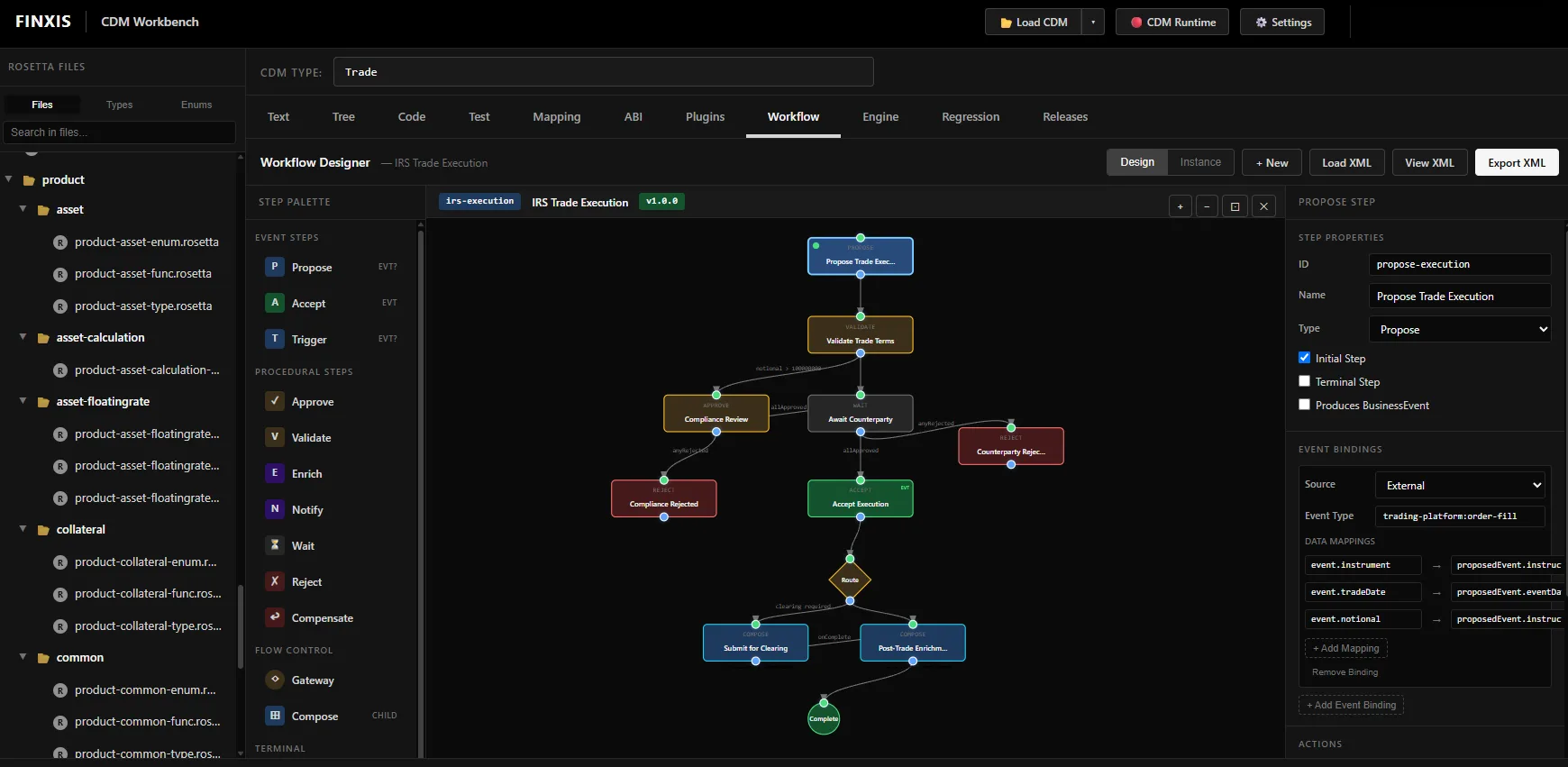
Workflow Designer — IRS Trade Execution Design · Instance · v1.0.0
CDM Workbench Workflow Designer showing an IRS trade execution state machine with step palette and event bindings
Jump to ModelCodeMappingWorkflowABIEngineTestReleases
ModelTree · UML · Graph
GeneratesJava · JSON · Rune
IngestsFpML · FIX · XML
Releases200+, production and development
Text · Tree · UML · Graph

Traverse the model, not the documentation.

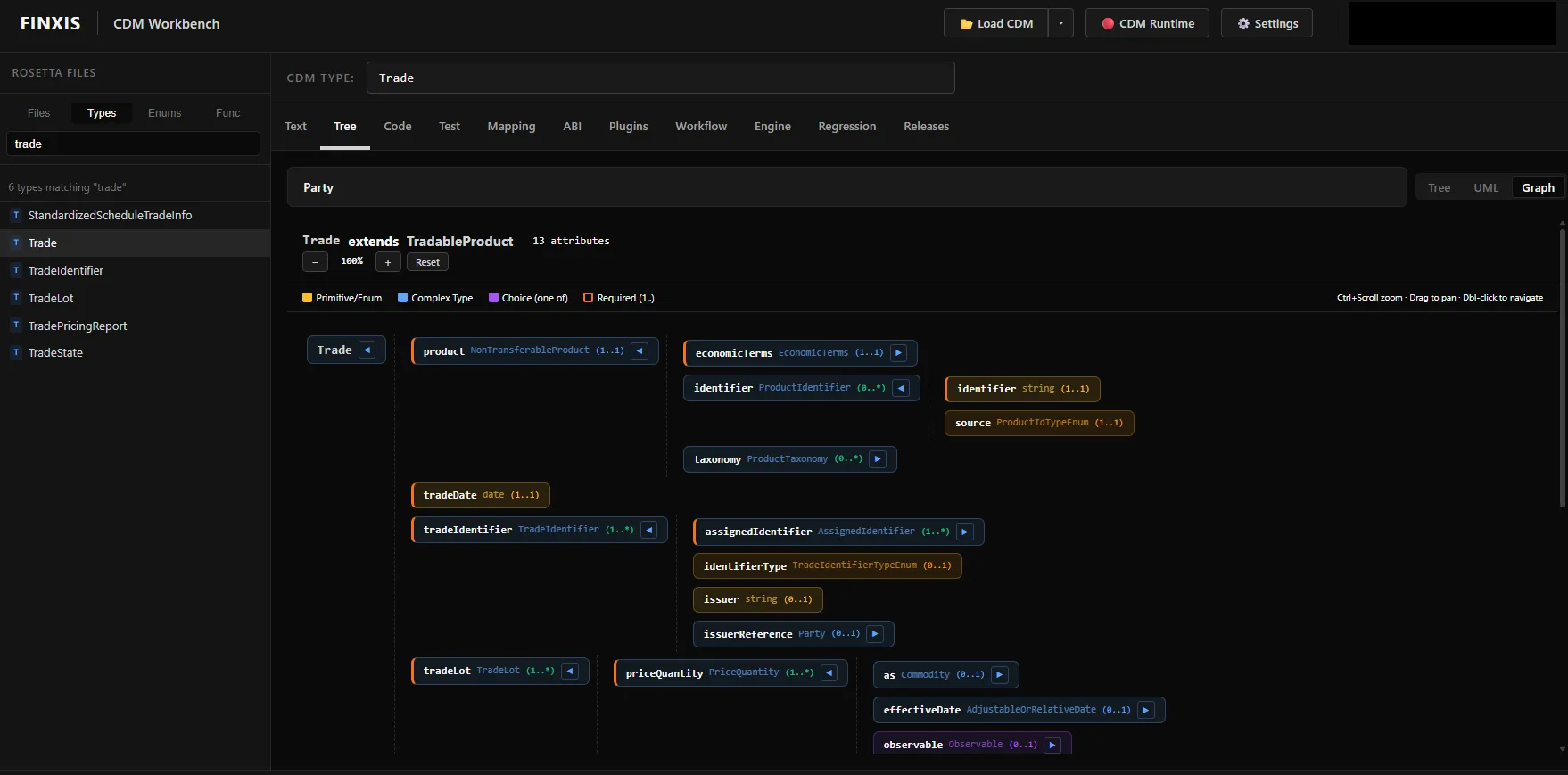
Open any CDM type and move through it as a tree, a UML view or an interactive graph. Cardinality, required attributes, choices and complex types are colour-coded, so the shape of a type is legible before you have read a word of it.

  • Browse by file, type, enum or function
  • Search across the full model — 1,000+ types and functions
  • Colour-coded primitives, complex types, choices and required fields
  • Zoom, pan and double-click to navigate deeper
  • Canonical product models included
Graph — Trade extends TradableProduct 13 attributes
CDM Workbench graph view of the Trade type showing attributes, cardinality and required fields
Code

Describe the trade. Get the object.

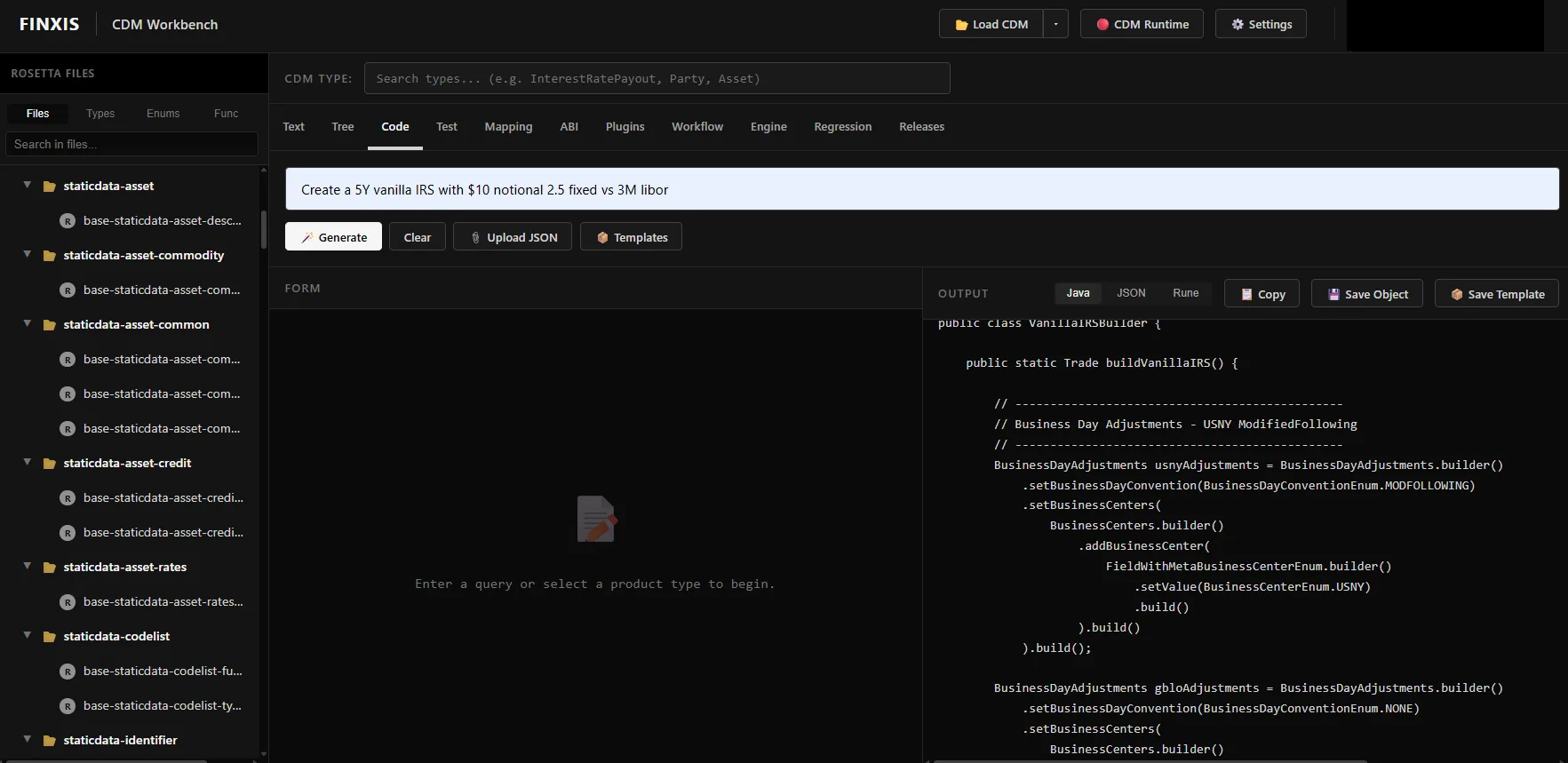
Enter a plain-language description — a 5Y vanilla IRS, $10m notional, 2.5 fixed against 3M Libor — and Workbench generates a valid CDM object. Review it as Java, JSON or Rune, save it, or keep it as a template for the team.

  • Output in Java, JSON or Rune from the same object
  • Upload existing JSON, or start from a saved template
  • Save objects and templates for reuse
  • Generated code is yours to review before anything ships
Code — generated from a description Java · JSON · Rune
CDM Workbench generating Java code for a vanilla interest rate swap from a natural language description
Mapping

Your data, into the model.

The model is the easy part. Integration means everything already flowing through the firm — FpML, FIX, XML and whatever else your counterparties send — arriving as valid CDM. Workbench is where those mappings are built and kept.

INGEST

External formats to CDM

Map FpML, FIX, XML and other message formats onto CDM types, with the model in front of you as you work.

REUSE

Mappings as artefacts

Mappings are saved, versioned and shared, rather than living in one developer's branch.

VERIFY

Check the result

Validate the mapped object against the model before it goes anywhere near a downstream system.

Workflow Designer

Lifecycle as a diagram, not a thousand lines of code.

Compose CDM lifecycle processes from a palette of steps — propose, validate, approve, enrich, notify, wait, reject, compensate — with gateways for routing and compose steps for nesting. Bind each step to the events your systems already emit.

EVENT STEPS

Propose · Accept · Trigger

The points where a workflow takes in or emits a CDM business event.

PROCEDURAL

Approve · Validate · Enrich · Notify · Wait · Reject · Compensate

The work between events, including compensation for unwinding a partial process.

FLOW CONTROL

Gateway · Compose

Route on conditions, and nest a workflow inside another as a child process.

BINDINGS

External events to CDM

Bind a source event — an order fill from a trading platform, say — and map its fields onto the CDM event.

Design mode builds the process; instance mode runs against real data. Workflows export as XML, so they live in your source control alongside everything else.
ABI

CDM to smart contract interfaces.

Map CDM types onto smart contract interfaces — ERC standards, or your own contracts. The same model that describes the trade in your systems describes it on chain, which is what makes CDM Node’s D-Node interface useful rather than theoretical.

STANDARDS

ERC interfaces

Map to established ERC token and contract standards.

CUSTOM

Your own contracts

Bind CDM types to bespoke smart contract interfaces where a standard does not fit.

OPTIONAL

Only if you need it

DLT is available, not assumed. Nothing here is required to use the rest of Workbench.

Engine

Run the workflow you just designed.

The CDM workflow runtime service. Execute a designed process against real data inside Workbench — so a lifecycle is something you watch run and debug, rather than something you hope behaves once it reaches an environment.

EXECUTE

Workflows against real data

Step through a process and see the CDM objects it produces at each stage.

DEBUG

Before it leaves the desk

Find the problem in design, not in an integration environment three weeks later.

PROMOTE

On to CDM Node

What runs here is what deploys to CDM Node for production messaging and transactions.

Test · Regression

Know what a version change breaks, before it breaks it.

Test CDM functions against real data, and build regression test files against your own custom model. Then load a different CDM release and run them again. A migration becomes a test result rather than a discovery.

TEST

CDM functions

Exercise functions directly against inputs you supply, and see the output object.

REGRESSION

Against your model

Create regression test files that cover your own extensions, not just the standard.

COMPARE

Across releases

Swap the loaded release and re-run. The difference is the migration scope.

Releases

Every release, one click away.

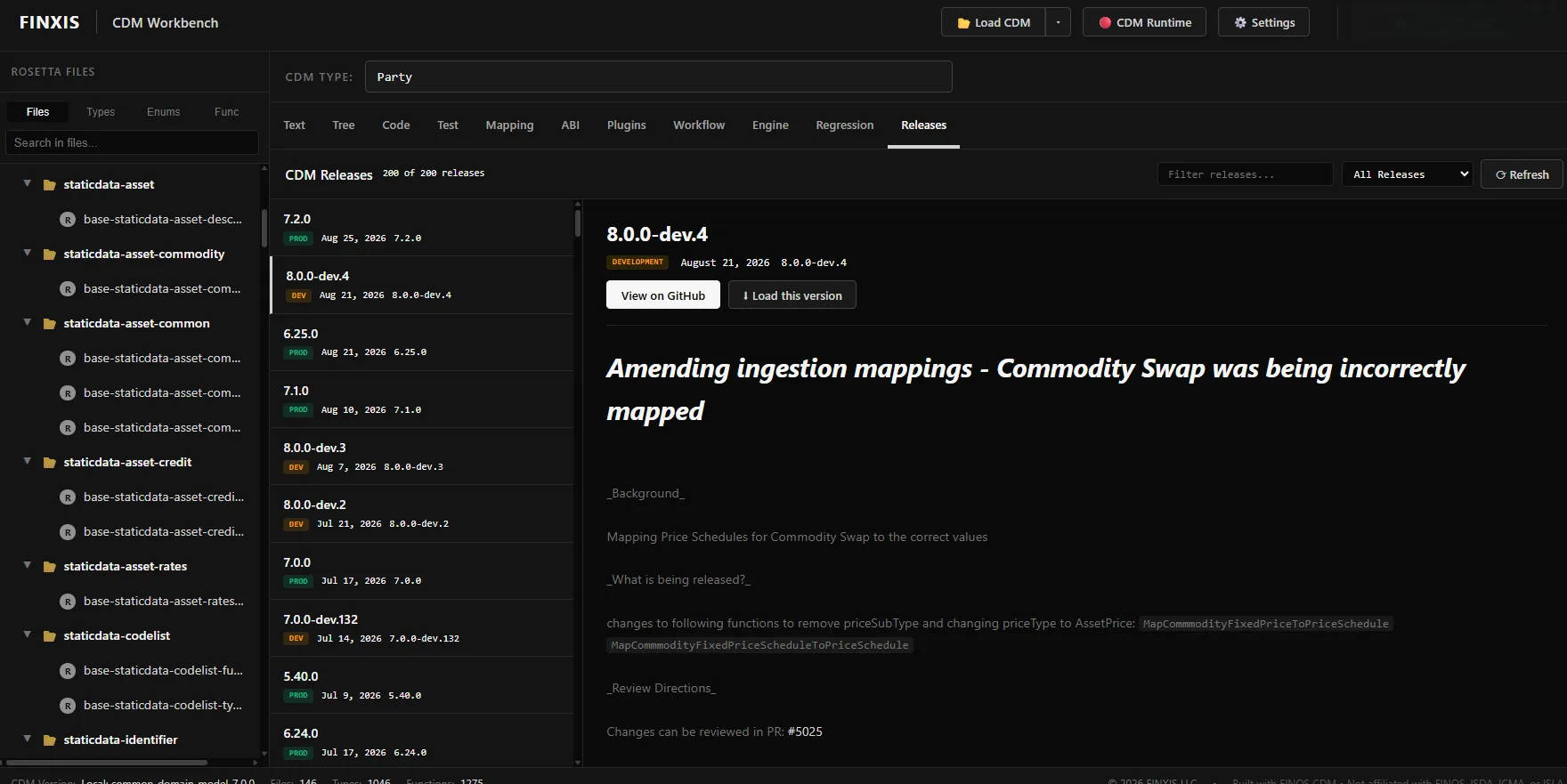
200+ CDM releases, production and development, with release notes and the pull request behind each change. Load any version into the workspace and work against it — including development branches, before they land.

  • Production and development lines, filterable
  • Release notes and PR references inline
  • Load any version into the workspace
  • Direct link to the release on GitHub
Releases — production and development Load · View on GitHub
CDM Workbench releases list showing production and development CDM versions with release notes
Who uses it

Built for the people doing the integration.

01

Developers & integrators

Generate code, map message formats, test functions and manage releases without assembling a local toolchain first.

02

Data modelers & architects

Work directly with the model, design lifecycle workflows, and see where the standard ends and your implementation begins.

03

Business analysts

Read the model without reading code, and use canonical products as the reference for how a trade should be represented.

DetailWorkbench
DeploymentBrowser-based. No local install, no build toolchain.
Model viewsText, Tree, UML and Graph
Code outputJava, JSON, Rune
Ingest formatsFpML, FIX, XML and other message formats
CDM releases200+, production and development
Workflow exportXML
ExtensibilityPlugin manager
Runs alongsideCDM Node, CDM Net, CDM Trader

Try it against your own data.

Start a trial, or browse the model for free first — the Model Browser is the same viewer that ships inside Workbench, with no signup.