FINXIS.
Reference buildPart of the Finxis CDM toolchain
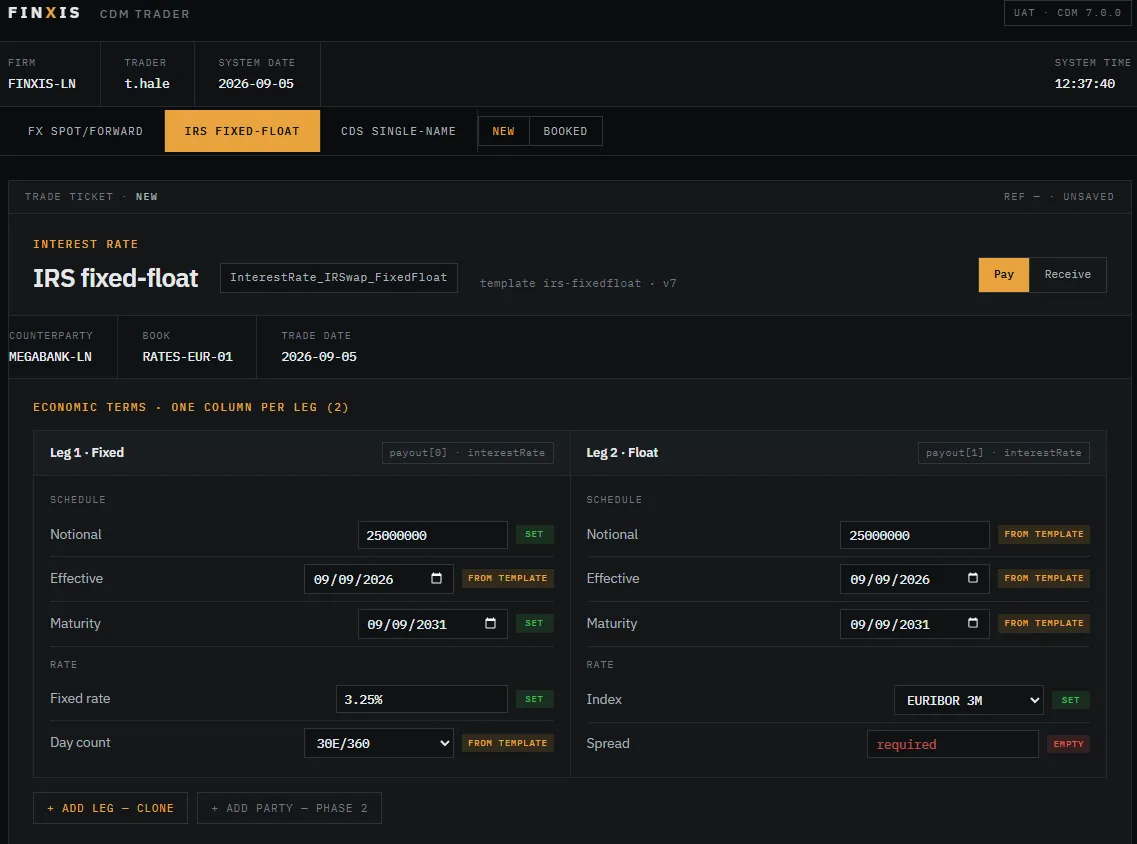
A trading application, generated from the model.

CDM Trader reads a canonical product and renders a working trade ticket for it — legs, schedules, rates, parties. Book the trade, run the lifecycle events, and the object you end up with is CDM all the way down. Add a product to the library and it appears here.

Generated from canonical products · Runs on CDM Node · No per-instrument UI work

Trade ticket — IRS fixed-float, generated from irs-fixedfloat CDM 7.0.0
CDM Trader trade ticket for a fixed-float interest rate swap, showing one column per leg with schedule and rate fields, and badges marking which values came from the canonical template
Jump to The ticketGenerated, not builtArchitectureCoverage
The ticket

A form that knows what it is looking at.

A generated UI can easily become a flat list of every field in the model, which is complete and unusable. Trader lays a product out the way a trader reads it — one column per leg, grouped into schedule and rate, showing the fields you book rather than every field that exists.

PROVENANCE

Every field is tagged

Set, from template, or required and empty. You can see at a glance what came from the canonical product and what you supplied.

TRACEABILITY

CDM paths on screen

Each leg carries its path — payout[0] · interestRate — so the form is visibly the model rather than something sitting beside it.

VERSIONED

Template and release named

The ticket header states which canonical product it came from and which CDM version it was generated against.

Generated, not built

The library is the application.

Most multi-asset applications are a screen per instrument, hand-built and hand-maintained. Trader has none. It renders whatever is in the canonical product library, so coverage grows with the library rather than with the codebase.

01

Pick a product

Any canonical product from the library, at the CDM version you are running.

02

Ticket renders

Legs, schedules, rates and parties, laid out from the product structure.

03

Book it

Values validate against the model as you enter them, not after you submit.

04

Run the lifecycle

Allocation, novation, termination and the rest, executed as CDM events.

That is also why Trader is the honest answer to "should we build this ourselves?" — it is the thing a team would spend a year building, and the parts that took the year are the ones you would rather not maintain.

Architecture

A front end over CDM Node.

Trader does not reimplement the CDM. The interface renders and edits the object; validation, qualification and lifecycle execution happen in CDM Node, against the generated Java. One implementation of correct, not two.

LayerDoesRuns
Trader front endRenders the ticket, builds and edits the CDM objectBrowser
Canonical librarySupplies the product structure and template valuesVersioned with the CDM release
CDM NodeValidation, qualification, lifecycle events, persistenceYour infrastructure

Which means a firm evaluating Trader is evaluating Node at the same time — and a firm that already runs Node has most of what Trader needs.

Coverage

What you can book.

Coverage follows the canonical library. Interest rate, credit, equity and FX today, with debt, financing and commodity products reserved as the library grows.

Asset classExamplesStatus
Interest RateFixed/float, basis, OIS, cross-currency, swaptions, caps and floors, FRAsLive
CreditSingle name, index, tranche, swaptionsLive
EquityPrice and total return swaps, CFDs, basketsLive
Foreign ExchangeSpot, forwards, swapsLive
DebtBondsPlanned
FinancingRepo, securities lendingPlanned
CommodityPlanned

Every product is browsable in the product library before you book anything — structure, JSON and generated code, on the page.

See it book a trade.

Browse the canonical products first, or start a trial and book one against your own CDM release.